

How to Submit an LCD Defect Report?
An LCD defect report is the documentation a wholesale buyer sends to a supplier when a replacement screen appears to fail - a written record built from product identification, order details, a precise description of the failure, and supporting evidence, submitted so the supplier can evaluate the issue instead of guessing at it. It is written for purchasing managers, quality-control staff, and after-sales teams at repair businesses, distributors, and importers who need a claim processed rather than a conversation started.
A report that skips any of these pieces usually comes back with questions before it moves forward at all, which is the main reason reports stall. The buyers who get the fastest reviews tend to be the ones who treat the report as a piece of iPhone LCD screen quality control documentation rather than a one-off email - the same habits that make a single claim move faster are what make a supplier relationship easier to manage over time.

Quick Answer: What a Usable LCD Defect Report Contains?
The short answer to how to submit an LCD defect report is: identify the exact product and order, state the quantity affected and the defect itself, record how and when it was tested, attach clear evidence, and say what resolution is being requested. Most suppliers can act on a report faster when it identifies the following ten fields:
- Product/model - exact iPhone model and screen specification
- Order or batch information - order number, shipment, and lot/batch where available
- Quantity affected - how many units out of how many received
- Defect type - the specific symptom, described precisely
- Testing/installation conditions - how and when the issue was found
- Photos or videos - clear evidence of the failure
- Test results - what happened during any comparison or repeat test
- Reproducibility - whether the issue can be triggered again
- Packaging/shipping condition - where relevant to the failure
- Requested resolution - what the buyer is asking the supplier to do next
Not every supplier requires all ten fields for every claim, and a minor cosmetic issue on a single unit doesn't need the same level of documentation as a pattern showing up across a carton. A report built around this list gives a supplier a much clearer starting point and can reduce unnecessary back-and-forth during the initial review.

What Is an LCD Defect Report?
In a B2B quality-control context, a defect report is a factual record of an observed failure, tied to a specific product and order, submitted so a supplier can assess cause and decide on next steps. It is not the same thing as a general complaint, which describes dissatisfaction without necessarily identifying the product or evidence needed to act on it - a complaint says something is wrong; a defect report says what, on which unit, under what conditions.
It's also worth separating from a few related terms it often gets grouped with. A warranty claim is the formal request for a remedy under agreed terms - the defect report is usually the evidence that supports that claim, not the claim itself.
An RMA request, by contrast, is the logistics step in a supplier's LCD RMA process that follows once a defect has been reviewed and a return or replacement path has been agreed. An incoming inspection record documents what was found on arrival, before any of these steps happen. The exact terminology and paperwork a given supplier uses can vary, so it's worth checking their process before assuming these terms all lead to the same form.
A defect report is also a different document from a test report. Where a defect report documents an observed field failure, what should be included in an LCD test report is planned QC data recorded before a shipment goes out - the two serve different points in the same quality-control process rather than competing versions of the same paperwork.
When Should a Buyer Submit an LCD Defect Report?
A report is worth filing whenever a screen shows behavior that doesn't match what was ordered or expected - display failure, unresponsive or erratic touch, abnormal brightness, visible lines, backlight issues, or dead pixels where that applies. It's also worth filing when the same failure shows up across multiple units, when a problem surfaces during incoming inspection before any units have shipped out to customers, or when a failure only appears once installation testing begins. None of these symptoms on their own confirm that a defective iPhone LCD screen left the factory that way - some point toward handling in transit, some toward installation, and some toward the device itself rather than the screen. The report's job is to lay out what was observed and tested clearly enough that cause can actually be assessed, not to assert a conclusion the evidence hasn't established yet.
The Defect-Report Workflow
Step 1 - Identify the Product
Record the exact iPhone model, the screen type or specification (OLED, LCD, quality grade if the supplier uses one), the product code or SKU if one was provided, the order number, purchase date, and any shipment or batch reference available. Vague identification - "the screens from last month" - is one of the most common reasons a report sits unanswered while someone tries to match it to an order. Checking the model against the applicable product page - an iPhone XS replacement LCD screen, for example - before writing the report avoids the common mix-up between visually similar models that carry different specifications.
Step 2 - Record the Quantity Affected
Note whether the issue involves a single unit, several units, or a meaningful share of a shipment, and whether the affected units are concentrated in one carton or spread across several. This distinction matters for figuring out whether the report is describing an isolated issue or something with a batch-level pattern - it's not about hitting a defect-rate threshold, since suppliers don't publish or apply a single universal number for that.
Step 3 - Describe the Defect Precisely
"Screen bad" or "not working" gives a quality team almost nothing to act on. A useful description says what happens, when it happens, whether it repeats, and whether the problem affects the whole display or a specific area - a strip of dead pixels along one edge is a different finding than intermittent flicker across the panel, and a report that treats them the same slows down diagnosis rather than speeding it up. Note whether touch response, display output, or brightness is affected, and be specific about which one.

Step 4 - Record Testing and Installation Conditions
A supplier evaluating a claim needs to know how the screen was tested - before full installation or only after, whether the original device was checked for pre-existing issues, and whether the connector and surrounding components were inspected where that's practical. It also helps to note whether the failure appeared before or after installation and whether the same test was repeated using a known-good screen for comparison. None of this requires detailed repair instructions; the goal is documentation of what was checked, not a DIY walkthrough.
Step 5 - Collect Evidence
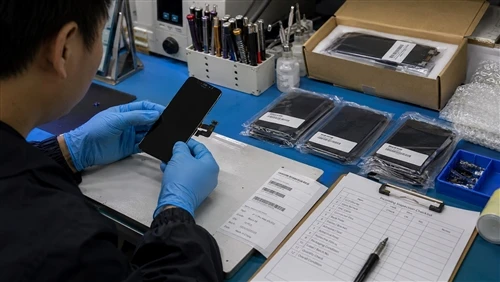
Clear photographs and short videos of the actual failure carry more weight than a written description alone. Useful evidence includes the display condition itself, a touch-test recording where relevant, packaging and carton labels, and - where physical damage is a possibility - close-up photos of the connector or panel edges. A side-by-side comparison against a known-good unit is often the single most useful piece of evidence a buyer can provide, since it removes ambiguity about whether the device or the screen is the source of the problem.

Step 6 - Record the Batch and Shipment Context
Order number, shipment reference, carton number, and batch or lot code (where the supplier provides one) all support traceability. Alongside these, record how many units were received, how many were inspected, and how many showed the issue. This context is what allows a supplier's quality team to check whether a report connects to other reports from the same batch - something a single isolated report, described without any shipment reference, can't support on its own.

Step 7 - Submit a Structured Report That Connects the Evidence
This is really the core idea behind how to submit an LCD defect report: a usable report isn't a list of complaints, it's a chain. Once the six fields above are gathered, they should be organized so a reviewer can move from product to order to batch to symptom to test condition to evidence to requested resolution without having to reconstruct that chain from separate messages. A short table plus attached evidence is usually easier for a quality team to process than several paragraphs of prose, precisely because a table keeps that chain visible.
What Makes a Defect Report Useful to a Factory QC Team?
From a factory quality-control desk, the value of a report has less to do with how many photos are attached and more to do with whether the pieces connect to each other - the same chain described in Step 7. A QC reviewer is trying to move from product to order to batch to symptom to test condition to evidence to quantity, and from there, to whatever pattern that chain reveals across other reports on file. A report with excellent photos but no order reference breaks that chain at the first link; a report with an order reference but no test conditions breaks it further down. Neither failure is about effort - both are usually just a missing field.
This is also why a defect report reads differently from a complaint once a QC team is the one reading it. A complaint asks to be believed. A defect report asks to be checked - and gives the reviewer what they need to do the checking themselves, which is generally what gets a claim moving.
LCD Defect Report Template
Buyers looking for a simple LCD inspection report template can start with the fields below and adapt them into whatever intake format a given supplier actually uses.
| Field | What to Record | Why It Matters |
|---|---|---|
| Product / Model | Exact iPhone model and screen specification | Identifies the product |
| Order No. | Relevant purchase/order reference | Connects the issue to the transaction |
| Batch / Lot | Available batch information | Supports traceability |
| Quantity Received | Total units received | Establishes inspection scope |
| Quantity Affected | Number of units with the issue | Helps assess severity |
| Defect Type | Specific symptom | Supports diagnosis |
| Test Conditions | How and when the issue was tested | Helps reproduce the problem |
| Evidence | Photos/videos/test records | Supports remote evaluation |
| Packaging Condition | Relevant packaging/shipping observations | Helps assess handling or transport factors |
| Requested Action | Evaluation, replacement, credit, RMA, etc. | Clarifies the buyer's requested next step |
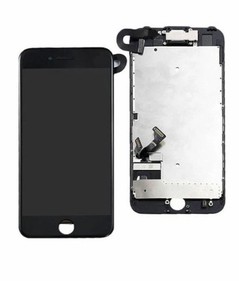
Not every supplier's intake form matches this exactly, but a report built around these ten fields covers what most quality teams need to open a review. The Product/Model field is worth getting right before anything else - confirming the listing against the actual product page, such as an iPhone 7 replacement LCD screen versus a similarly specced alternative, avoids a mismatch that can stall the rest of the review.

Manufacturing Defect or Something Else?
A screen that isn't working doesn't automatically mean it left the factory defective. Buyers who distinguish installation damage from a manufacturing defect before filing a claim tend to get faster responses, because the report already rules out the most common alternative explanation instead of leaving the supplier to ask about it.
| Observation | Possible Interpretation | What Evidence Helps |
|---|---|---|
| Repeated identical failure across multiple units | Potential batch-level issue | Batch records and test results |
| Physical impact or cracked component | Possible handling/installation damage | Clear close-up photos |
| Problem disappears with a known-good screen | Screen-related issue becomes more likely | Controlled comparison |
| Problem follows the device rather than the replacement screen | Possible device-side issue | Cross-testing |
| Issue appears only after installation | Requires further diagnosis | Installation/test records |
None of these observations settles the question by itself - they're starting points for further checking, not conclusions to write into the claim.

Making a Report Easier for a Supplier to Process
A well-built report tends to share a few habits that consistently shorten the time between filing and resolution:
- File one report per clearly defined issue, and use the exact model, order number, and batch reference rather than approximate ones
- Attach clear media and note the test conditions instead of just the outcome
- Separate what was directly observed from what's being assumed, and state the quantity affected even when it's a single unit
- Keep the relevant packaging and labels rather than discarding them before the report is reviewed
- Keep the language factual rather than accusatory, and state clearly what resolution is being requested
The tone matters almost as much as the content - a report that reads as a factual quality record moves through a supplier's process differently than one that reads as a dispute.
Common LCD Defect-Reporting Mistakes
The other side of the same coin - what a report looks like when one of those fields is missing, and what it costs:
| Mistake | Consequence |
|---|---|
| Reporting only "screen defective" | Supplier can't identify the actual symptom |
| Not stating the model | Delays matching the claim to the right product |
| Omitting affected quantity | Severity can't be assessed |
| Blurry or partial photos | Evidence can't support a remote evaluation |
| No test conditions recorded | Failure can't be reproduced or understood |
| Mixing several defects into one report | Slows diagnosis of each individual issue |
| Assuming every failure is a manufacturing defect | Can lead to a claim being questioned or declined |
| Discarding packaging or batch info early | Removes evidence needed for traceability |
| Skipping a known-good comparison | Leaves device-vs-screen ambiguity unresolved |
| Submitting without order information | Claim can't be tied to a transaction |
Batch-Level Quality Issues
A single defect report is a data point. A pattern across several reports - same defect type, same model, same batch or shipment window - is what actually points toward a batch-level concern rather than an isolated unit failure. Buyers who track defect type, affected quantity, batch, model, and the dates units were received and issues discovered build the internal record that makes this kind of pattern visible, and the same tracking discipline is what supports handling defective screens in a bulk order without treating every individual claim as a one-off. No defect rate or acceptance threshold is assumed here - those figures, where they exist at all, are set between buyer and supplier, not by a general industry standard.
What a Supplier May Need to Evaluate a Claim?
Requirements vary by supplier. Most quality teams work from some version of the same core set: product identification, order and batch information, a defect description, testing conditions, photographic or video evidence, quantity affected, physical condition, and comparison-test results where they exist. None of this guarantees a particular outcome - a supplier's decision to evaluate, replace, or decline a claim depends on more than any single field in the report, and what a given supplier's warranty terms actually cover is worth checking before assuming a defect report alone settles the matter.
Example: A Professional LCD Defect Report
The following is an illustrative template - the product, order details, and figures below are examples only and do not represent a real customer record. The same basic reporting structure can be applied across different models, though the specific technical checks and documentation a supplier asks for may vary by product and by supplier.
- Product: iPhone X replacement LCD, Incell AAA
- Order No.: NORA-X-1200
- Batch/Lot: 20260826
- Quantity Received: 1200 units
- Quantity Affected: 6 units
- Defect: Intermittent horizontal line across upper third of display, appears within 2–3 minutes of power-on, reproducible on all affected units
- Test Conditions: Tested on bench prior to installation using Dedicated test jig; confirmed not present on a known-good unit from a prior order
- Evidence: Photos and video attached showing the line at onset; carton and label photos attached
- Requested Action: Evaluation of the affected units and guidance on replacement or credit
Defect Reporting as Part of B2B Quality Control
Handled consistently, defect reporting becomes more than a way to resolve individual claims - it feeds supplier evaluation, informs incoming inspection standards, supports batch traceability, and gives purchasing teams a record to weigh when deciding whether to reorder from the same supplier or adjust order volume. The goal of a good defect report was never to prove that a supplier is at fault; it's to hand over enough connected evidence - the same product-to-resolution chain from Step 7 - that the supplier can determine what happened and what should happen next.
LCD Defect Report Checklist for Wholesale Buyers
- Exact iPhone model recorded
- Product specification/grade recorded where relevant
- Order information recorded
- Batch/lot information preserved where available
- Quantity received recorded
- Quantity affected recorded
- Defect clearly described
- Test conditions recorded
- Photos/videos collected
- Physical condition documented
- Packaging information preserved where relevant
- Comparison test performed where appropriate
- Requested resolution clearly stated
FAQ
What information should an LCD defect report contain?
At minimum: the exact product/model, order and batch reference, quantity affected, a precise defect description, testing conditions, and supporting photos or video. A requested resolution at the end of the report helps the supplier know what outcome is being asked for.
Should buyers test a replacement screen before full installation?
Where practical, yes - testing before full installation, and comparing against a known-good screen when a failure appears, gives the clearest evidence of whether the problem sits with the screen or somewhere else.
How can buyers distinguish a manufacturing defect from installation damage?
Neither can be confirmed from the symptom alone. Physical damage, connector condition, whether the issue follows the screen or the device, and whether it persists across a known-good comparison all help narrow down the cause - but this is usually a "requires further diagnosis" situation rather than something one symptom proves outright.
What evidence should be included in an LCD warranty claim?
The same evidence a defect report needs - product identification, order/batch reference, defect description, test conditions, and clear photos or video - since the claim is usually built on that documentation.
Should repeated defects from the same batch be reported together?
When the evidence genuinely supports it - same defect type, same batch, same failure pattern - grouping them helps a supplier see the pattern faster than several separate reports would. Unrelated defects shouldn't be bundled just because they arrived in the same shipment.
What should buyers do if the supplier needs more evidence?
Provide it as specifically as requested rather than resending the same photos or description. A follow-up that adds a new test result, a clearer photo, or a comparison against a known-good unit usually moves the claim forward faster than a repeated general description.
Getting a Defect Report to the Right Place
An LCD defect report earns a fast response when it gives a supplier everything needed to work the case: the product and order, what failed, how it was tested, the evidence, and the outcome being requested. Buyers handling a live claim can send that documentation alongside a request for the supplier's warranty terms and batch quality-control information, so the claim and the terms that govern it get reviewed in the same conversation instead of two separate ones.
The same fields are also useful before a defect ever happens. A buyer comparing suppliers ahead of a larger order can ask how replacement screens are graded and tested pre-shipment, what a defective iPhone LCD screen has to look like before it qualifies for an RMA, and how batch and lot data is tracked for traceability. Those answers say more about a supplier's actual quality-control process than a grade name on a price list - and they're worth getting in writing before volume production starts, not after the first defect report has to be filed.